Latest Post
Showing posts with label AES Detector. Show all posts

AES Detector v1.1.1 released


Dear All AES Detecter Users,

Here are the changes for version v1.1.1 :

- Fixed continuing beeping alert issue
- Enlarge camera distance font size as requested by user.
- Upgrade adobe air v3.5

Please update to get the latest patch.
Thanks for your support.
 

AES Detector now available in App Store !

To all ios user,

Finally, AES Detector now is available in apple App Store. It is FREE for download.


App store link : https://itunes.apple.com/us/app/aes-detector/id573753132?ls=1&mt=8
The current version published in app store is the latest version same with android version.
Feel free to try. Cheers.
 

AES Detector v1.1.0 released


New version v1.1.0 is available for update.

Here are the changes for v1.1.0
- Enhanced 2km detection alert when driving above 100km/h
- Fixing minor issued reported by user.
- Retired google admob advertisement

Kindly update to latest version for better experience.
Thanks for your support. 
 

AES Detector v1.0.9 released

Dear All AES Detector Users,


The main features build into this version is the beep pulse alert when your speed is beyond the speed limit. Besides, the driving speed panel will flashing in red color to alert you.

In previous version, read phone state permission has been highlighted from our user and as i promised, i had dropped it out in this version onwards. Hope you can used it without hassle and concern.  :)

Here are the changes for v1.0.9 :
- Adding 3 second beep pulse alert when speed exceed limit
- Flashing driving speed background when exceed limit
- Remove read phone state permission as requested
- Fixed location display issue in Tablet reported by user


Thanks again and appreciate your feedback and support.
 

AES Detector v1.0.8 released with speed detection


Dear All AES Detector Users,

AES Detector v1.0.8 now released with speed detection. System will show your driving speed and compare versus speed camera limit.


Here are the changes for v1.0.8 :
- Add on driving speed (Accuracy of the speed is depends on the GPS signal)
- Speed background will turn red if your speed exceed the camera's speed limit
- Update camera location GPS point
- Change to graphical GPS signal
- Read Phone State Permission

Due to our user concern on read phone state permission :
Version v1.0.8 is included with new advertisement network (Millennial Media).
The permission is required by this network, kindly check on this link :


Thanks for all your great support, hope the system can assists all of you.
 

AES Detector v1.0.7 released with 2KM detection

Dear All AES Detector Users,

Finally AES Detector v1.0.7 manage to detect camera within 2KM. It was a great news for those who are waiting for this features.
Here are the changes for v1.0.7 :

- 2KM detection for Speed Camera
- 800M detection for Traffic Light Camera
- Auto turn on your phone value up to 80%
- Change icon to differentiate camera type
- Disabled count down alert for inactive camera
- Tentative disable beep sound (running background)

*For professional drivers (> 1xx km/h), you may try this version. This system should work a little bit smarter than earlier version. Hope the system can alerts you on time.

Thanks for all your great support, hope the system can assists all of you.
Here are the icons you will see in version 1.0.7:
Traffic Light Camera Icon
Speed Camera Icon


Here are the screenshot for inactive camera :


Problem Locating GPS Signal ?

Best Ways to Fix Android GPS Satellites Navigation
Granting A GPS might solve your problem but it that doesn’t solve you should make use of GPS Status & Toolbox Android app. This application on your phone will clear all the cache and the nre download you’re A GPS data and which in turn can help you to re-acquire the correct satellite. 

First thing to ensure from your end is you should have turn on the GPS settings. To do that from your phone head to Settings > Location & Security and then tick Use Wireless Networks and Use GPS Satellites. By default your phone only uses the signal reception from GPS satellite and granting this access will help AGPS chip to give out quick results. 

Once you have downloaded this application you need to do the following :

1. ) Launch GPS Status & Toolbox and you will see the compass and raw data. Tap on the menu button for more options.
GPS Toolbox

2. )Then from the Tools select Manage A GPS state.
Manage AGPS

3. ) Finally click on Reset and then click on Download.
AGPS Download

When its done exit from the App.
 

AES Detector version 1.0.7 coming soon.

New version of AES Detector v1.0.7 is just around the corner, stay tune for the updates.
Now, it can detects the AES camera up to 2km (speed camera).
Here are the indicator you will see in this version to differentiate the type of camera:
TRAFFIC LIGHT INDICATOR                         SPEED LIMIT INDICATOR


There's lot more features will be added in soon.
Your support is greatly appreciated.
 

AES Camera Location (Update Status)

14 AES Camera Location (LIVE)
We just started our side verification process to verify the location of the camera.
Thanks to our AES Detector Volunteers Team Member.

  1. KM D7.7 Sungai Besi (Verified by Mr. Kevin Chua) - It is Mobile, NOT FIXED CAMERA
  2. Jalan Persiaran Timur (Verified by Mr. Kevin Chua) - It is Mobile, NOT FIXED CAMERA
  3. Km 301.9, Kajang (Verified by Mr. Fook)
  4. Jalan Lebuh Sentosa (Verified by Mr. Prince Rijal) 
  5. Km 6.6 Jalan Kajang/ Puchong (Verified by Mr. Ir Zulkifli, Mr. Prince Rijal) 
  6. Jalan Klang Lama (Verified by Kevin Chua)
  7. Jalan Ipoh  (Verified by Mr.Avan)
  8. KM 7 Jalan Maharajalela Teluk Intan 
  9. KM 376, L/Raya PLUS - Slim River (Verified by Mr. Kevin Chua)  [ available on version 1.0.5]
  10. KM 91 Jalan Ipoh -Butterworth
  11. KM 85.5 Jalan Ipoh - Kuala Lumpur
  12. KM 205.6 Taiping Utara
  13. KM 26 Jalan Ipoh - Kuala Kangsar
  14. Jalan Pasir Putih (Berhampiran TNB) (Verified by Mr. Kevin Chua)  [ available on version 1.0.7]
If you have the detect the actual AES camera location via AES Detector, kindly screen capture screen from your mobile phone and email me at chuasw23@gmail.com.
You contribution is highly appreciated.


AES Detector v1.0.6 released (Minor Update)

After accumulate all of our users idea/feedback, version 1.0.6 was released mainly to fix some of the user request.
The most important is location KM 376, L/Raya PLUS - Slim River was verified this morning and already included the latest GPS point in this version.

Here are the summary update of changes :
- Default language to English
- Add on landscape mode
- Add on stay awake capability
- Reposition exit button
- Enlarge font and show graphic to display the speed limit
- Enhanced sounds alert
- Showing beep alert every 30 second when running in background (userful for Papago and Waze User).

Screenshot :


This screenshot layout is taken  from HTC Desire HD - ICS Custom ROM.
Note : Remember to check update via play store in order to get this new layout.
Thanks for your support.


Why AES Detector didn't alert you ?

Dear All AES Detector User,

Base on the feedback posted in the review, we found that some users failed to detect AES camera or cannot hear any alert sound when bypass the AES Camera.

Please check your GPS signal status on AES Detector.
You need to make sure your GPS Status is showing "STRONG" on the screen.

Tips to get strong GPS Signal:
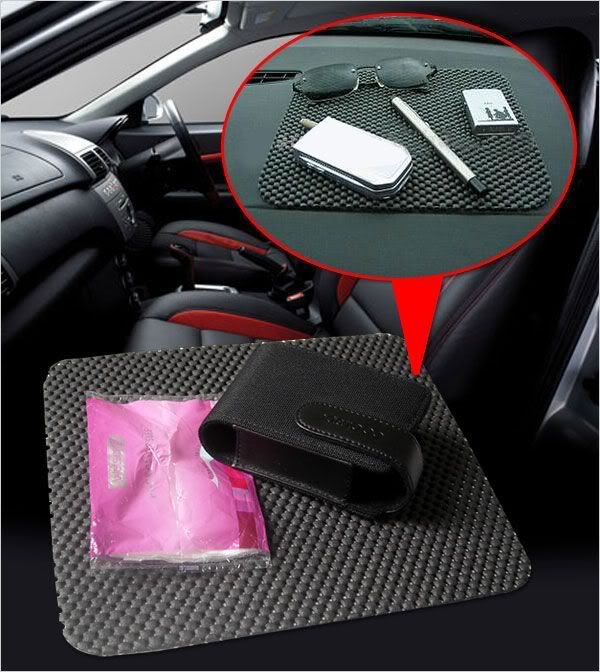
Buy an Anti Slip Mat and place your phone face up the wind screen. You should able to locate our GPS   signal within few seconds.

 
Hope this can solve your issue.
Appreciate and thanks for your support on AES Dectector.
 

Suggestion/Idea by AES Detector Users

Suggestion/Idea

Sunday, October 21, 2012 at 01:29 - Unknown
Range inflexibility & other suggestions Suggest to include range selection options for flexibility, instead of sticking on 500m. some people may have different preferences on the range distance. Other suggestions = Let's say I have driven to the exact spot of the AES camera as what have been pin-pointed by your APP, you may code the APP to pop-up a question for us to pick answers such as "ACCURATE SPOT", "INACCURATE SPOT" or "NON-EXISTENT AES" in order to auto gather information for you to further improve your APP through periodical updates to fix those issues. Add-on = If user selected "ACCURATE SPOT", the APP should run the Camera app on the spot for the user to snapshot the picture of the AES camera for verification purpose to avoid fake information submitted to you. I'm sure you'll understand what I mean, I believe you can come up with better ideas by being aware of my rough ideas. I fully support the development of this APP to be improved from time to time.

Friday, October 19, 2012 at 09:59 - Edmund
Good attempt Good attempt! And it works. There's an AES camera located on the highway that I drive to work every morning, and this app detected it (with my phone GPS turned on). I believe the app has all the AES coordinates released by JPJ last month, hence when you are approaching one, it will trigger an alert. My only two suggestions: (1) Increase the range from 500m to at least 1km (or 1.5km is even better). This will give motorists more time to slow down esp if they are driving fast. (2) If possible, put the speed limit into the alert announcement as well. This will let motorists know what speed limit they should be driving at. Nonetheless, it is a good app. Thank you very much.


Thursday, October 18, 2012 at 21:34 - Jason 
Request on range expansion Hi, glad that you came up with this great idea. I'm not sure it's whether working or not till I try it out real soon. However, it will be great if you increase the range from 500m to 1km or 1.5km in order to alert the user. This will greatly reduce the possibility for the "OMG! It's too late!" cases. Thanks.

Thursday, October 18, 2012 at 19:48 - Yao Wei
Improvement required If can increase the radius from 500m to 1000m will be useful as well. :-D

Thursday, October 18, 2012 at 18:32 - HoeSin
Not bad, keep it on. Need some improvement on the on off button, i cant actually difference when is on and when is off...by the way, well done. :-)


Wednesday, October 17, 2012 at 13:49 - Kenny
Good! Usefull and good work on this apps. Can it be add the display *speed limit * when reach the AES around 500m? Need the speed limit so that can slow down moving.thanks

Wednesday, October 17, 2012 at 10:35 - en
ahGee wonder if the detection range can be increase to 1000m.
 

Objective of AES Detector


Main Objective of AES Detector
        • Try improve your driving attitude when you alert from the AES Detector
        • With the sound alert, i believed it can avoid user from holding or watching on your phone while driving 
        • Friendly alert features that remind you to avoid commit traffic offences
        • Indirectly save your pocket money if you didn't commit any traffic offences
Detect it, you are safe. 
 

How to use AES Detector ?

Once your double click to launch AES Detector from your phone, application will start the detection job automatically.
There is only 1 criteria required by AES Detector is must turn on GPS.

Splash Screen                                    Main Screen


Camera detected 


Light Features


Language Features


What is AES Detector?


AES Detector is a mobile application to detect then the new launching AES Camera in Malaysia. 
System will auto trigger alert sound to remind you when detected any AES Camera within 1000 meter from your driving point. Make sure you turn on your mobile phone speaker in order to hear the alert sound.
Note : This application can only be used in MALAYSIA only

You can download the application direct from the Android Market via this link :
https://play.google.com/store/apps/details?id=air.AESDetector
Base on the data published in JPJ portal, there 831 location will be targeted to implement AES Camera. Kindly refer to the JPJ Portal for more details --> Click HERE
From the source reported earlier that the full complement of 831 Automated Enforcement System (AES) cameras will be up and running in 18 months from now, with the cams set to be deployed in stages. Already, 14 AES cameras have been operational since September 23, and these are installed at various hotspots or accident prone areas in the Klang Valley and Perak.


Copyright © 2011. AES Detector - All Rights Reserved
Proudly powered by Blogger